alearningpro
alearningpro
  • Home
  • Online Learning
    • Online Learning
    • autocad-register
    • photoshop-landing
    • max-landing
    • revit-landing
    • navis-landing
    • ACC-landing
    • BEP-landing
    • PMP-Landing
    • excel-landing
    • powerbi-landing
    • PMP-Journey-free
    • BIM_Manage_Pre-contract
    • BIM_Manage_Post-contract
  • subscribe
  • BIM Resources
  • Careers
  • Contact Us
  • More
    • Home
    • Online Learning
      • Online Learning
      • autocad-register
      • photoshop-landing
      • max-landing
      • revit-landing
      • navis-landing
      • ACC-landing
      • BEP-landing
      • PMP-Landing
      • excel-landing
      • powerbi-landing
      • PMP-Journey-free
      • BIM_Manage_Pre-contract
      • BIM_Manage_Post-contract
    • subscribe
    • BIM Resources
    • Careers
    • Contact Us
  • Sign In
  • Create Account

  • Bookings
  • My Account
  • Signed in as:

  • filler@godaddy.com


  • Bookings
  • My Account
  • Sign out

Signed in as:

filler@godaddy.com
  • Home
  • Online Learning
    • Online Learning
    • autocad-register
    • photoshop-landing
    • max-landing
    • revit-landing
    • navis-landing
    • ACC-landing
    • BEP-landing
    • PMP-Landing
    • excel-landing
    • powerbi-landing
    • PMP-Journey-free
    • BIM_Manage_Pre-contract
    • BIM_Manage_Post-contract
  • subscribe
  • BIM Resources
  • Careers
  • Contact Us

Account

  • Bookings
  • My Account
  • Sign out

  • Sign In
  • Bookings
  • My Account

    BIM COORDINATION USING AUTODESK NAVISWORKS

    BIM Coordination - multidisciplinary model aggregation up to advanced clash detection & coordination


    If you are working in a client organization, project management consultancy, design and supervision consultant, contracting company, engineering firm, BIM department, coordination team, or as a BIM Coordinator, Architect, Engineer, or Project Manager, then this training program is designed for you.

    Develop your coordination and digital construction capabilities in a collaborative and multidisciplinary environment with practical experience inspired by real mega projects, international coordination workflows, and industry best practices used across complex AEC projects.


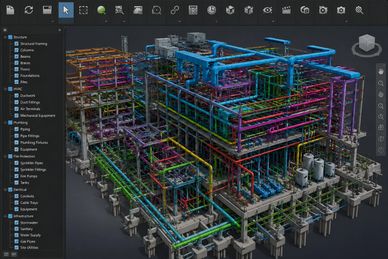
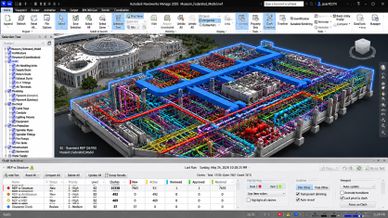
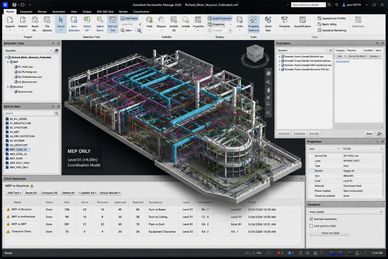
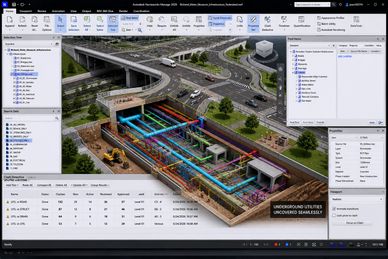
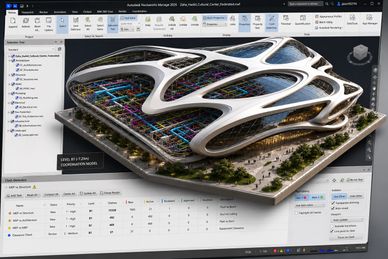
    This PROFESSIONAL course of BIM Coordination using Autodesk Navisworks covers the complete coordination workflow from model aggregation and review up to clash detection, coordination reporting, issue tracking, and project coordination management.

    (Combined disciplines coordination, model federation, clash detection, clash grouping, clash rules, coordination review, issue management, viewpoints, time-liner basics, quantification basics, and multidisciplinary collaboration workflows.)

    PARTICIPATE IN BUILDING BETTER COORDINATED PROJECTS AND EXPAND YOUR CAREER OPPORTUNITIES.

     Enhance your BIM coordination understanding and align it with international standards, coordination workflows, and construction best practices. Develop strong multidisciplinary coordination skills, improve communication between project stakeholders, reduce clashes and rework, and achieve a highly professional BIM Coordination profile to support your career growth in the AEC industry.


    FREE SESSION

    Do you want to Register?

    send us the screen shot of your payment on whatsapp to: 00971522872305

    Click HERE!

    Introduction

     Welcome to A Learning PRO, a professional educational training provider (established in the UAE) committed to delivering industry-driven programs in architecture, engineering, construction, BIM, and digital project delivery. As an Autodesk Authorized Training Center (ATC), Autodesk Authorized Academic Partner, and Autodesk Learning Partner, we ensure that our training aligns with the latest global standards, BIM workflows, and construction coordination best practices. 

    This course is delivered by certified instructors with real-world project experience, and upon successful completion, attendees will receive Autodesk authorized course completion certificates, adding strong international credibility to their professional profile. 


    This course is designed to transform your capabilities from fundamental BIM understanding to advanced multidisciplinary BIM Coordination and federated model management using AUTODESK NAVISWORKS. It equips you with practical skills to efficiently aggregate, review, coordinate, analyze, and manage multidisciplinary BIM models across real-world project workflows. Participants will learn professional coordination processes including clash detection, clash management, issue tracking, coordination communication, model review workflows, and construction coordination practices used in complex AEC projects. 


    By the end of this program, you will not only enhance your technical expertise in BIM Coordination but also significantly improve your employability and career growth potential within the AEC industry. This course represents your first strategic step toward becoming a professional BIM Coordinator or BIM Manager, enabling you to confidently participate in multidisciplinary project coordination, reduce project clashes and rework, improve collaboration between stakeholders, and meet the evolving demands of modern digital construction projects. 

    Summarized Course Content

    •  Introduction to BIM Coordination & Navisworks 
    • Navisworks Interface & Navigation 
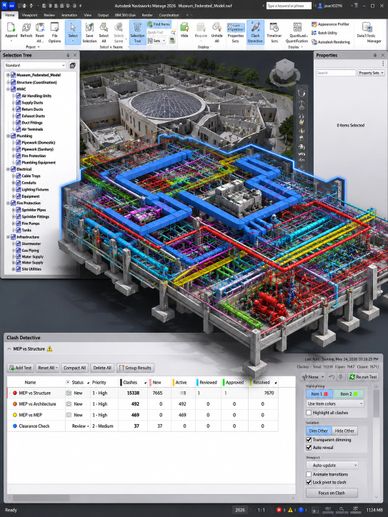
    • Model Aggregation & Federated Models 
    • Model Review 
    • Search Sets 
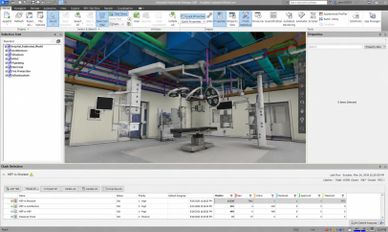
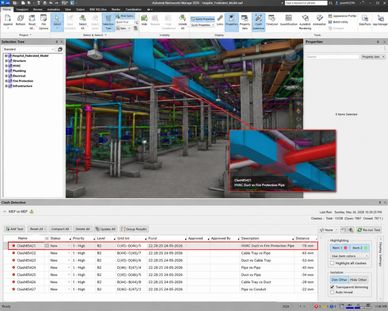
    • Clash Detection Fundamentals 
    • Advanced Management 
    • Coordination Workflows for Different Disciplines 
    • BIM Coordination Best Practices 
    • many others

    Outcome (Summarized)


    • Create and manage federated BIM models. 
    • Perform clash detection workflows professionally. 
    • Analyze and resolve multidisciplinary clashes. 
    • Conduct BIM Coordination meetings effectively. 
    • Manage coordination communication and reporting. 
    • Apply BIM Coordination best practices in real projects. 
    • Use Autodesk Navisworks professionally within AEC workflows.

    Enroll Now

    Course Content

    Introduction to BIM Coordination & Autodesk Navisworks

    Introduction to BIM Coordination & Autodesk Navisworks

    Introduction to BIM Coordination & Autodesk Navisworks

    •  Introduction to BIM Coordination concepts. 
    • Role of BIM Coordination within the project lifecycle. 
    • Coordination workflows in design and construction projects. 
    • BIM Coordination vs BIM Modeling. 
    • Introduction to Autodesk Navisworks products: 
      • Navisworks Manage. 
      • Navisworks Simulate. 
      • Navisworks Freedom. 
    • Understanding federated models. 
    • Real project coordination workflows. 
    • Coordination roles and responsibilities. 
    • Supported file formats (RVT, IFC, NWC, NWD, DWG, FBX, etc.).

    Autodesk Navisworks Interface & Navigation

    Introduction to BIM Coordination & Autodesk Navisworks

    Introduction to BIM Coordination & Autodesk Navisworks


    • Understanding the Navisworks interface. 
    • Workspaces and UI customization. 
    • Navigation tools and view control. 
    • Orbit, walk, fly, and inspect tools. 
    • ViewCube and SteeringWheel tools. 
    • Visual styles and rendering modes. 
    • Selection Tree and Scene View. 
    • Properties panel and object information. 
    • Units, transforms, and coordinates. 
    • Saving viewpoints and navigation settings.

    Model Aggregation & Federated Models

    Introduction to BIM Coordination & Autodesk Navisworks

    Model Aggregation & Federated Models


    • Importing and appending models. 
    • Working with: 
      • Revit models. 
    • Creating federated coordination models. 
    • Managing linked and appended models. 
    • Understanding model origins and shared coordinates. 
    • Model alignment and positioning workflows. 
    • Organizing models for coordination. 
    • NWC vs NWD workflows. 
    • Export workflows from Revit to Navisworks.

    Model Review & Visualization

    Model Review & Visualization

    Model Aggregation & Federated Models


    • Visibility and appearance management. 
    • Hide/unhide/isolate workflows. 
    • Transparency and color overrides. 
    • Appearance Profiler. 
    • Sectioning tools and clipping planes. 
    • Reviewing crowded MEP areas. 
    • Object inspection and properties review. 
    • Reviewing discipline-specific models. 
    • Saved viewpoints and annotations. 
    • Redlining and markup workflows. 
    • Review comments and coordination communication. 

    Search Sets & Selection Sets

    Model Review & Visualization

    Search Sets & Selection Sets


    • Creating manual Selection Sets. 
    • Search conditions and rules. 
    • Organizing coordination workflows using sets. 
    • Grouping systems and disciplines. 
    • Reusable coordination templates. 
    • Best practices for large projects.

    Clash Detection Fundamentals

    Model Review & Visualization

    Search Sets & Selection Sets


    • Introduction to clash detection workflows. 
    • Hard clashes vs clearance clashes. 
    • Understanding clash tolerance. 
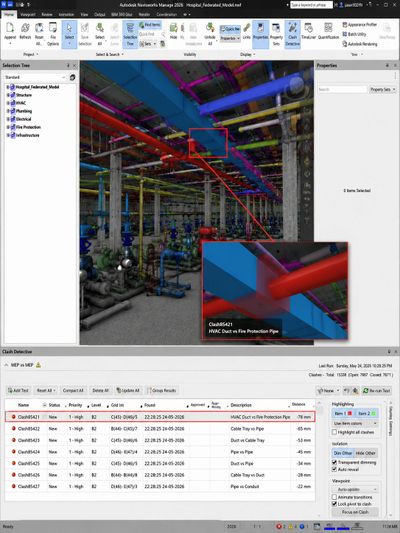
    • Creating Clash Tests. 
    • Clash detection between disciplines: 
      • Architecture vs Structure. 
      • Structure vs MEP. 
      • MEP vs MEP. 
    • Clash test setup and optimization. 
    • Running clash tests. 
    • Reading and analyzing clash results. 
    • Clash viewpoints and saved coordination views.

    Advanced Clash Management

    Coordination Workflows for Different Disciplines

    Coordination Workflows for Different Disciplines


    • Clash grouping workflows. 
    • Clash status management: 
      • New. 
      • Active. 
      • Reviewed. 
      • Approved. 
      • Resolved. 
    • Clash prioritization and severity analysis. 
    • Clash matrix creation. 
    • Clash rules and filtering. 
    • Coordination meetings workflows. 
    • Assigning coordination responsibilities. 
    • Coordination issue tracking workflows. 
    • Reducing false-positive clashes. 
    • Coordination reporting standards.

    Coordination Workflows for Different Disciplines

    Coordination Workflows for Different Disciplines

    Coordination Workflows for Different Disciplines


    Architectural Coordination

    • Space coordination. 
    • Ceiling coordination. 
    • Architectural clearances. 

    Structural Coordination

    • Structural openings coordination. 
    • Beam and slab penetrations. 
    • Concrete and steel coordination. 

    MEP Coordination

    • HVAC coordination. 
    • Plumbing coordination. 
    • Firefighting coordination. 
    • Electrical coordination. 
    • Cable tray and containment coordination. 

    Infrastructure & Landscape Coordination
    • Utility coordination. 
    • Site coordination workflows.

    BIM Coordination Standards & Best Practices

    Coordination Workflows for Different Disciplines

    BIM Coordination Standards & Best Practices


    • BIM Coordination standards overview. 
    • Naming conventions. 
    • Model segregation strategies. 
    • Clash management procedures. 
    • Coordination meeting workflows. 
    • QA/QC workflows for coordination. 
    • BIM Execution Plan (BEP) coordination requirements. 
    • Coordination deliverables and documentation.

    Coordination Reporting & Communication

    Integration with Autodesk Construction Cloud (ACC)

    BIM Coordination Standards & Best Practices


    • Creating professional coordination reports. 
    • Exporting clash reports. 
    • HTML and viewpoint exports. 
    • Coordination presentation workflows. 
    • Managing review comments. 
    • Coordination communication strategies. 
    • Reporting for consultants and contractors. 
    • Coordination dashboards and summaries.

    Integration with Autodesk Construction Cloud (ACC)

    Integration with Autodesk Construction Cloud (ACC)

    Integration with Autodesk Construction Cloud (ACC)


    • Navisworks and ACC integration. 
    • Coordination workflows using ACC. 
    • Model Coordination module overview. 
    • Cloud-based issue tracking. 
    • Coordination approvals and workflows. 
    • ACC vs local coordination workflows. 
    • Best practices for cloud collaboration.

    Final Project & Assessment

    Integration with Autodesk Construction Cloud (ACC)

    Integration with Autodesk Construction Cloud (ACC)


    • Full federated model coordination project. 
    • Clash detection and reporting assessment. 
    • Coordination workflow presentation. 
    • Team coordination exercise. 
    • Final coordination report submission. 
    • Practical assessment and review. 
    • Autodesk course completion requirements.

    aLearningPRO international global network

    IMPROVEMENT

    99% improved their working conditions and experience at the end of our training program. 

    Rate

    The rate of the quality and material of our training programs exceeds 98% positive rates by our programs candidates.

    NEW POSITION/JOB OPPORTUNITY

    75% start NEW position or find new job opportunities after completing this training program

    Job positions of aLearningPRO candidates

    Specialist/Author/Modeler

    Manager/Director/Team Lead

    Manager/Director/Team Lead

    85% of the candidate enrolling to this training course have an experience ranges from 00 years (fresh graduates) up to 19 years of experience.

    Manager/Director/Team Lead

    Manager/Director/Team Lead

    Manager/Director/Team Lead

    seniors, team leaders, and design managers with 7+ years of experience are also enrolling to this comprehensive training program to learn BIM modeling in the phases LOD 100 to LOD 300 (pre-design, concept design, preliminary design, schematic design, detailed design and tender phases). they cover about 10% of the candidates enrolling to this course.

    CEO/Founder/Others

    Manager/Director/Team Lead

    CEO/Founder/Others

    it is not only about juniors, specialists, modelers, managers, designers, or team leaders. in addition to others, CEOs, Co. Founders, BIM Managers, BIM Coordinators, and many other positions are joining this training course. they join either to gain knowledge or to sharpen their experience. in both scenarios this category covers around 5% of the candidates. 

    BIM MODELING USING AUTODESK REVIT

    Outcome

    • Create and manage federated BIM models. 
    • Perform professional clash detection workflows. 
    • Analyze and resolve multidisciplinary clashes. 
    • Conduct BIM Coordination meetings effectively. 
    • Manage coordination communication and reporting. 
    • Apply BIM Coordination best practices aligned with industry standards. 

    Register NOW!

    Target Audience

    • Architects and engineers working as clients, client representatives, consultant engineers, contractor engineers working in the AEC industry 
    • Interior designers 
    • Landscape architects and engineers 

    • Engineering firm owners 
    • Consulting team members
    • Consulting team leaders and head of departments
    • Authority architects and designers.

    • Urban design engineers
    • Landscape architects
    • Designers
    • Draftsman
    • site architects


    • Project managers
    • Digital transformation leaders, managers
    • Design specialists 

    • Construction managers, technical managers, design managers
    • BIM managers, BIM coordinators, BIM Modelers

    • Business owners, CEO's, & Directors

    Do you want to Register?

    send us the screen shot of your payment on whatsapp to: 00971522872305

    Click HERE!

    Our Partners & Customers

    Copyright © 2020-2028 A | Learning Pro

    All Rights Reserved.

    • Online Learning
    • subscribe
    • terms_conditions
    • privacy_policy
    • BIM Resources

    Created By alearningpro

    This website uses cookies.

    We use cookies to analyze website traffic and optimize your website experience. By accepting our use of cookies, your data will be aggregated with all other user data.

    Accept